
表单
富文本编辑器
简介
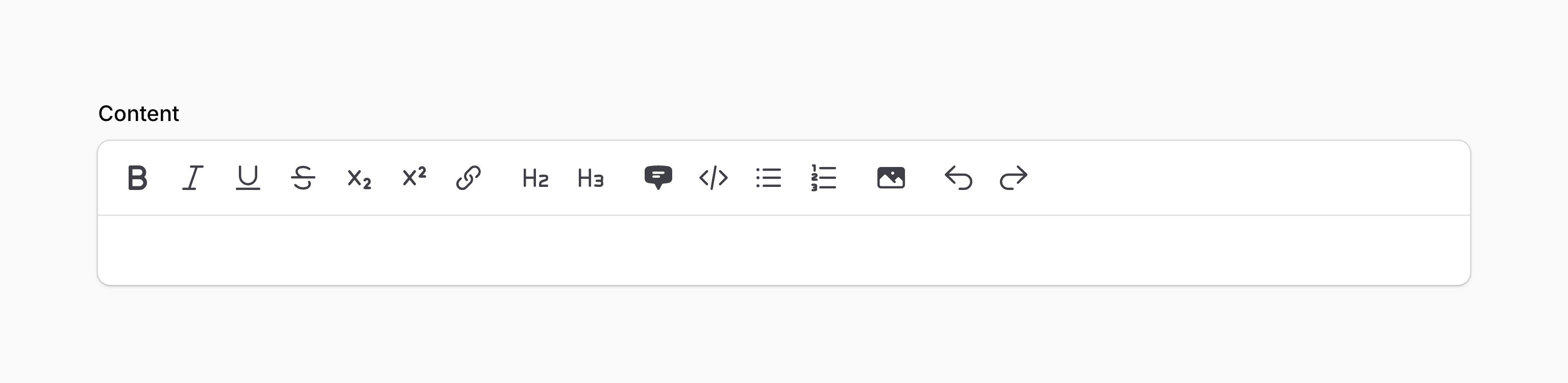
富文本编辑器允许你编辑和预览 HTML 内容,以及上传图片。它使用 TipTap 作为底层编辑器。
use Filament\Forms\Components\RichEditor;

RichEditor::make('content')
将内容存储为 JSON
默认情况下,富文本编辑器将内容存储成 HTML,如果你想将其存储为 JSON 格式,你可以使用 json() 方法:
use Filament\Forms\Components\RichEditor;

RichEditor::make('content')
    ->json()
该 JSON 是以 TipTap 的格式存储,它是内容的结构化表示。
如果你使用 Eloquent 来保存 JSON 标签,你应该确保将 array cast 添加到模型属性中:
use Illuminate\Database\Eloquent\Model;

class Post extends Model
{
    protected $casts = [
        'content' => 'array',
    ];

    // ...
}
自定义工具栏按钮
使用 toolbarButtons() 方法,你可以设置编辑器的工具栏按钮。此例中的选项为默认值。此外,'h1' 也可用:
use Filament\Forms\Components\RichEditor;

RichEditor::make('content')
    ->toolbarButtons([
        ['bold', 'italic', 'underline', 'strike', 'subscript', 'superscript', 'link'],
        ['h2', 'h3'],
        ['blockquote', 'codeBlock', 'bulletList', 'orderedList'],
        ['attachFiles'], // The `customBlocks` and `mergeTags` tools are also added here if those features are used.
        ['undo', 'redo'],
    ])
主数组中的每个嵌套数组都表示工具栏中的一组按钮。
除了允许静态值之外,toolbarButtons() 方法也接收函数来计算它的值。你可以将各种 utility 作为参数注入到该函数中。
Learn more about utility injection.
| Utility | Type | Parameter | Description |
|---|---|---|---|
| Field | Filament\Forms\Components\Field | $component | The current field component instance. |
| Get function | Filament\Schemas\Components\Utilities\Get | $get | A function for retrieving values from the current form data. Validation is not run. |
| Livewire | Livewire\Component | $livewire | The Livewire component instance. |
| Eloquent model FQN | ?string<Illuminate\Database\Eloquent\Model> | $model | The Eloquent model FQN for the current schema. |
| Operation | string | $operation | The current operation being performed by the schema. Usually create, edit, or view. |
| Raw state | mixed | $rawState | The current value of the field, before state casts were applied. Validation is not run. |
| Eloquent record | ?Illuminate\Database\Eloquent\Model | $record | The Eloquent record for the current schema. |
| State | mixed | $state | The current value of the field. Validation is not run. |
渲染富文本内容
如果你将内容存储为 JSON而非 HTML,或者你的内容需要处理以注入私有图片 URL等,你将需要使用 Filament 中 RichContentRenderer 工具来输出 HTML:
use Filament\Forms\Components\RichEditor\RichContentRenderer;

RichContentRenderer::make($record->content)->toHtml()
toHtml() 方法返回一个字符串。如果你想要在 Blade 视图中输出 HTML 而不进行转义,你可以输出 RichContentRender 而不调用 toHtml()
{{ \Filament\Forms\Components\RichEditor\RichContentRenderer::make($record->content) }}
如果你已经配置了编辑器的文件附件行为以修改上传文件的磁盘或可见性,则还必须将这些设置传递给渲染器,以确保生成正确的 URL:
use Filament\Forms\Components\RichEditor\RichContentRenderer;

RichContentRenderer::make($record->content)
    ->fileAttachmentsDisk('s3')
    ->fileAttachmentsVisibility('private')
    ->toHtml()
如果你在富文本编辑器中使用了自定义 Block,你可以将自定义 Block 数组传入到渲染器,以确保其正确渲染:
use Filament\Forms\Components\RichEditor\RichContentRenderer;

RichContentRenderer::make($record->content)
    ->customBlocks([
        HeroBlock::class => [
            'categoryUrl' => $record->category->getUrl(),
        ],
        CallToActionBlock::class,
    ])
    ->toHtml()
如果你要使用合并标签,你可以传入值数组来替换要合并标签:
use Filament\Forms\Components\RichEditor\RichContentRenderer;

RichContentRenderer::make($record->content)
    ->mergeTags([
        'name' => $record->user->name,
        'today' => now()->toFormattedDateString(),
    ])
    ->toHtml()
安全
默认情况下,该编辑器输出原始 HTML,并将其发送到后端。攻击者能够拦截组件的值,并将不同的原始 HTML 字符串发送到后端。因此,从富文本编辑器输出 HTML 时,对其进行净化非常重要;否则,你的网站可能会暴露于跨站点脚本(XSS)漏洞。
当 Filament 在 TextColumn 和 TextEntry 等组件中从数据库输出原始 HTML 时,它会对其进行净化,以删除任何危险的 JavaScript。但是,如果你在自己的 Blade 视图中输出来自富文本编辑器的 HTML,这是你的责任。一种选择是使用 Filament 的 sanctizeHtml() 助手函数来执行此操作,这与我们在上述组件中用于净化 HTML 的工具相同:
{!! str($record->content)->sanitizeHtml() !!}
如果你将内容存储为 JSON而非 HTML,或者你的内容需要处理以注入私有图像 URL或类似行为,你可以使用内容渲染器以输出 HTML。这将为你自动净化 HTML,因此你无需为此担心。
上传图片到编辑器
默认情况下,上传的图片被公开保存到你的存储磁盘中,以便保存到数据库中的富文本内容可以在任何地方轻松地输出到。你可以使用配置方法,自定义图片的上传方式:
use Filament\Forms\Components\RichEditor;

RichEditor::make('content')
    ->fileAttachmentsDisk('s3')
    ->fileAttachmentsDirectory('attachments')
    ->fileAttachmentsVisibility('private')
除了允许静态值之外,fileAttachmentsDisk()、fileAttachmentsDirectory(), 和 fileAttachmentsVisibility() 方法也接受函数来动态计算它们的值。你可以将各种 utility 作为参数注入到函数中。
Learn more about utility injection.
| Utility | Type | Parameter | Description |
|---|---|---|---|
| Field | Filament\Forms\Components\Field | $component | The current field component instance. |
| Get function | Filament\Schemas\Components\Utilities\Get | $get | A function for retrieving values from the current form data. Validation is not run. |
| Livewire | Livewire\Component | $livewire | The Livewire component instance. |
| Eloquent model FQN | ?string<Illuminate\Database\Eloquent\Model> | $model | The Eloquent model FQN for the current schema. |
| Operation | string | $operation | The current operation being performed by the schema. Usually create, edit, or view. |
| Raw state | mixed | $rawState | The current value of the field, before state casts were applied. Validation is not run. |
| Eloquent record | ?Illuminate\Database\Eloquent\Model | $record | The Eloquent record for the current schema. |
| State | mixed | $state | The current value of the field. Validation is not run. |
TIP
Filament 也支持使用 spatie/laravel-medialibrary 来存储富文本文件附件。请查阅插件文档了解更多信息。
在编辑器中使用私有图像
在编辑器中使用私有图像会增加处理流程的复杂性,因为私有图像无法通过永久 URL 直接访问。每次加载编辑器或渲染其内容时,都需要为每个镜像生成临时 URL,这些 URL 永远不会存储在数据库中。Filament 为图像标签添加了 data-id 属性,该属性包含图像在存储磁盘中的标识符,以便可以根据需要生成临时 URL。
使用私有图像渲染内容时,请确保使用 Filament 中的 RichContentRenderer 工具输出 HTML:
use Filament\Forms\Components\RichEditor\RichContentRenderer;

RichContentRenderer::make($record->content)
    ->fileAttachmentsDisk('s3')
    ->fileAttachmentsVisibility('private')
    ->toHtml()
使用自定义 Block
自定义 Block 是用户可以拖拽到富文本编辑器的元素。使用 customBlocks() 方法,你可以定义用户可以插入到富文本编辑器的自定义的 Block:
use Filament\Forms\Components\RichEditor;

RichEditor::make('content')
    ->customBlocks([
        HeroBlock::class,
        CallToActionBlock::class,
    ])
每个 Block 需要对应的类,继承自 Filament\Forms\Components\RichEditor\RichContentCustomBlock 类。getId() 方法应该为 Block 返回为一标识符,而 getLabel() 方法则返回编辑器的侧边面板中展示的标签:
use Filament\Forms\Components\RichEditor\RichContentCustomBlock;

class HeroBlock extends RichContentCustomBlock
{
    public static function getId(): string
    {
        return 'hero';
    }

    public static function getLabel(): string
    {
        return 'Hero section';
    }
}
当用户将自定义 Block 拖拽到编辑器中时,你可以选择打开模态框以在插入该 Block 前收集用户的额外信息。为此,你可以使用 configureEditorAction() 方法配置插入 Block 时将会打开的模态框:
use Filament\Actions\Action;
use Filament\Forms\Components\RichEditor\RichContentCustomBlock;

class HeroBlock extends RichContentCustomBlock
{
    // ...

    public static function configureEditorAction(Action $action): Action
    {
        return $action
            ->modalDescription('Configure the hero section')
            ->schema([
                TextInput::make('heading')
                    ->required(),
                TextInput::make('subheading'),
            ]);
    }
}
Actiion 上的 schema() 方法可以定义将会在模态框中展示的表单字段。当用户提交表单时,表单数据将会被保存为该 Block 的“配置”。
为自定义 Block 渲染预览
一旦将 Block 插入到编辑器后,你可以使用 toPreviewHtml() 方法为其定义“预览”。该方法返回 Block 插入后展示在编辑器中的 HTML 字符串,它允许用户在保存之前查看该 Block 的外观。你可以在此方法中访问 Block 的 $config,该变量包含插入 Block 之后在模态框中提交的数据:
use Filament\Forms\Components\RichEditor\RichContentCustomBlock;

class HeroBlock extends RichContentCustomBlock
{
    // ...

    /**
     * @param  array<string, mixed>  $config
     */
    public static function toPreviewHtml(array $config): string
    {
        return view('blocks.previews.hero', [
            'heading' => $config['heading'],
            'subheading' => $config['subheading'] ?? 'Default subheading',
        ])->render();
    }
}
如果你想自定义编辑器中预览上方显示的标签,可以定义 getPreviewLabel()。默认情况下,它将使用 getLabel() 方法中定义的标签,但 getPreviewLabel() 可以访问 Block 的 $config,从而允许你在标签中显示动态信息:
use Filament\Forms\Components\RichEditor\RichContentCustomBlock;

class HeroBlock extends RichContentCustomBlock
{
    // ...

    /**
     * @param  array<string, mixed>  $config
     */
    public static function getPreviewLabel(array $config): string
    {
        return "Hero section: {$config['heading']}";
    }
}
使用自定义 Block 渲染内容
当渲染富文本内容时,你可以传递自定义 Block 数组到 RichContentRender,用以确保这些 Block 可以正确渲染:
use Filament\Forms\Components\RichEditor\RichContentRenderer;

RichContentRenderer::make($record->content)
    ->customBlocks([
        HeroBlock::class,
        CallToActionBlock::class,
    ])
    ->toHtml()
每个 Block 类有一个 toHtml() 方法,它返回该 Block 要渲染的 HTML:
use Filament\Forms\Components\RichEditor\RichContentCustomBlock;

class HeroBlock extends RichContentCustomBlock
{
    // ...

    /**
     * @param  array<string, mixed>  $config
     * @param  array<string, mixed>  $data
     */
    public static function toHtml(array $config, array $data): string
    {
        return view('blocks.hero', [
            'heading' => $config['heading'],
            'subheading' => $config['subheading'],
            'buttonLabel' => 'View category',
            'buttonUrl' => $data['categoryUrl'],
        ])->render();
    }
}
如上所示,toHtml() 方法接收两个参数:$cofig 包含 Block 插入时模态框中提交的配置数据,以及 $data 包含渲染 Block 所需的其他数据。它允许访问配置数据并相应地渲染 Block。数据可以在 customBlocks() 中传入:
use Filament\Forms\Components\RichEditor\RichContentRenderer;

RichContentRenderer::make($record->content)
    ->customBlocks([
        HeroBlock::class => [
            'categoryUrl' => $record->category->getUrl(),
        ],
        CallToActionBlock::class,
    ])
    ->toHtml()
默认打开自定义 Block 面板
如果你想在加载富文本编辑器时,默认打开 Block 面板,你可以使用 activePanel('customBlocks') 方法:
use Filament\Forms\Components\RichEditor;

RichEditor::make('content')
    ->customBlocks([
        HeroBlock::class,
        CallToActionBlock::class,
    ])
    ->activePanel('customBlocks')
使用合并标签
合并标签允许用户在其富文本内容中插入“占位符”,这些占位符可以在内容渲染时被动态值替换。这对于插入当前用户姓名或当前日期等内容非常有用。
要在编辑器上注册合并标签,请使用 mergeTags() 方法:
use Filament\Forms\Components\RichEditor;

RichEditor::make('content')
    ->mergeTags([
        'name',
        'today',
    ])
合并标签用双花括号括起来,例如 {{ name }}。内容渲染时,这些标签将被替换为相应的值。
要将合并标签插入内容,用户可以输入 {{ 来搜索要插入的标签。或者,他们可以点击编辑器工具栏中的“合并标签”工具,这将打开一个包含所有合并标签的面板。然后,他们可以将合并标签从编辑器的侧面板拖放到内容中,或者点击插入。
使用合并标签渲染内容
渲染富文本内容时,你可以传递一个值数组来替换合并标签:
use Filament\Forms\Components\RichEditor\RichContentRenderer;

RichContentRenderer::make($record->content)
    ->mergeTags([
        'name' => $record->user->name,
        'today' => now()->toFormattedDateString(),
    ])
    ->toHtml()
如果你有多个合并标签,或者需要运行一些逻辑来确定它们的值,可以使用一个函数作为每个合并标签的值。当内容中第一次遇到合并标签时,将调用此函数,并将其结果缓存起来,以供后续同名标签使用:
use Filament\Forms\Components\RichEditor\RichContentRenderer;

RichContentRenderer::make($record->content)
    ->mergeTags([
        'name' => fn (): string => $record->user->name,
        'today' => now()->toFormattedDateString(),
    ])
    ->toHtml()
默认打开合并标签面板
如果你希望在加载富文本编辑器时默认打开合并标签面板,可以使用 activePanel('mergeTags') 方法:
use Filament\Forms\Components\RichEditor;

RichEditor::make('content')
    ->mergeTags([
        'name',
        'today',
    ])
    ->activePanel('mergeTags')
注册富文本内容属性
富文本编辑器配置中有一些元素同时适用于编辑器和渲染器。例如,如果你使用了私有图片、自定义 Block、合并标签或插件,则需要确保在两个地方使用相同的配置。为此,Filament 提供了一种注册富文本内容属性的方法,这些属性可以在编辑器和渲染器中使用。
要在 Eloquent 模型上注册富文本内容属性,你应该使用 InteractsWithRichContent trait 并实现 HasRichContent 接口。这样你就可以在 setUpRichContent() 方法中注册这些属性:
use Filament\Forms\Components\RichEditor\Models\Concerns\InteractsWithRichContent;
use Filament\Forms\Components\RichEditor\Models\Contracts\HasRichContent;
use Illuminate\Database\Eloquent\Model;

class Post extends Model implements HasRichContent
{
    use InteractsWithRichContent;

    public function setUpRichContent(): void
    {
        $this->registerRichContent('content')
            ->fileAttachmentsDisk('s3')
            ->fileAttachmentsVisibility('private')
            ->customBlocks([
                HeroBlock::class => [
                    'categoryUrl' => fn (): string => $this->category->getUrl(),
                ],
                CallToActionBlock::class,
            ])
            ->mergeTags([
                'name' => fn (): string => $this->user->name,
                'today' => now()->toFormattedDateString(),
            ])
            ->plugins([
                HighlightRichContentPlugin::make(),
            ]);
    }
}
无论你何时使用 RichEditor 组件时,都会使用对应属性注册的配置:
use Filament\Forms\Components\RichEditor;

RichEditor::make('content')
为了轻松地从具有给定配置的模型中渲染丰富的内容 HTML,你可以调用模型上的 renderRichContent() 方法,并传递属性的名称:
{!! $record->renderRichContent('content') !!}
或者,你也可以获取 Htmlable 对象,以不转义 HTML 进行渲染。
{{ $record->getRichContentAttribute('content') }}
在表格中使用 文本列 或在信息列表中使用文本条目时,你无需手动渲染富文本内容。Filament 会自动为你完成此操作:
use Filament\Infolists\Components\TextEntry;
use Filament\Tables\Columns\TextColumn;

TextColumn::make('content')

TextEntry::make('content')
富文本编辑器扩展
你可以为富文本编辑器创建插件,它允许你将自定义 TipTap 扩展以及自定义工具栏按钮添加到编辑器和渲染器。创建一个实现 RichContentPlugin 接口的新类:
use Filament\Actions\Action;
use Filament\Forms\Components\ColorPicker;
use Filament\Forms\Components\RichEditor;
use Filament\Forms\Components\RichEditor\EditorCommand;
use Filament\Forms\Components\RichEditor\Plugins\Contracts\RichContentPlugin;
use Filament\Forms\Components\RichEditor\RichEditorTool;
use Filament\Support\Enums\Width;
use Filament\Support\Facades\FilamentAsset;
use Filament\Support\Icons\Heroicon;
use Tiptap\Core\Extension;
use Tiptap\Marks\Highlight;

class HighlightRichContentPlugin implements RichContentPlugin
{
    public static function make(): static
    {
        return app(static::class);
    }

    /**
     * @return array<Extension>
     */
    public function getTipTapPhpExtensions(): array
    {
        // This method should return an array of PHP TipTap extension objects.
        // See: https://github.com/ueberdosis/tiptap-php

        return [
            app(Highlight::class, [
                'options' => ['multicolor' => true],
            ]),
        ];
    }

    /**
     * @return array<string>
     */
    public function getTipTapJsExtensions(): array
    {
        // This method should return an array of URLs to JavaScript files containing
        // TipTap extensions that should be asynchronously loaded into the editor
        // when the plugin is used.

        return [
            FilamentAsset::getScriptSrc('rich-content-plugins/highlight'),
        ];
    }

    /**
     * @return array<RichEditorTool>
     */
    public function getEditorTools(): array
    {
        // This method should return an array of `RichEditorTool` objects, which can then be
        // used in the `toolbarButtons()` of the editor.

        // The `jsHandler()` method allows you to access the TipTap editor instance
        // through `$getEditor()`, and `chain()` any TipTap commands to it.
        // See: https://tiptap.dev/docs/editor/api/commands

        // The `action()` method allows you to run an action (registered in the `getEditorActions()`
        // method) when the toolbar button is clicked. This allows you to open a modal to
        // collect additional information from the user before running a command.

        return [
            RichEditorTool::make('highlight')
                ->jsHandler('$getEditor()?.chain().focus().toggleHighlight().run()')
                ->icon(Heroicon::CursorArrowRays),
            RichEditorTool::make('highlightWithCustomColor')
                ->action(arguments: '{ color: $getEditor().getAttributes(\'mark\')?.data-color }')
                ->icon(Heroicon::CursorArrowRipple),
        ];
    }

    /**
     * @return array<Action>
     */
    public function getEditorActions(): array
    {
        // This method should return an array of `Action` objects, which can be used by the tools
        // registered in the `getEditorTools()` method. The name of the action should match
        // the name of the tool that uses it.

        // The `runCommands()` method allows you to run TipTap commands on the editor instance.
        // It accepts an array of `EditorCommand` objects that define the command to run,
        // as well as any arguments to pass to the command. You should also pass in the
        // `editorSelection` argument, which is the current selection in the editor
        // to apply the commands to.

        return [
            Action::make('highlightWithCustomColor')
                ->modalWidth(Width::Large)
                ->fillForm(fn (array $arguments): array => [
                    'color' => $arguments['color'] ?? null,
                ])
                ->schema([
                    ColorPicker::make('color'),
                ])
                ->action(function (array $arguments, array $data, RichEditor $component): void {
                    $component->runCommands(
                        [
                            EditorCommand::make(
                                'toggleHighlight',
                                arguments: [[
                                    'color' => $data['color'],
                                ]],
                            ),
                        ],
                        editorSelection: $arguments['editorSelection'],
                    );
                }),
        ];
    }
}
你可以使用 plugins() 方法为富文本编辑器和富文本内容渲染器注册插件:
use Filament\Forms\Components\RichEditor;
use Filament\Forms\Components\RichEditor\RichContentRenderer;

RichEditor::make('content')
    ->toolbarButtons([
        ['bold', 'highlight', 'highlightWithCustomColor'],
        ['h2', 'h3'],
        ['bulletList', 'orderedList'],
    ])
    ->plugins([
        HighlightRichContentPlugin::make(),
    ])

RichContentRenderer::make($record->content)
    ->plugins([
        HighlightRichContentPlugin::make(),
    ])
设置 TipTap JavaScript 扩展
Filament 能够异步加载 TipTap 的 JavaScript 扩展。为此,你需要创建一个包含扩展的 JavaScript 文件,并将其注册到插件的 getTipTapJsExtensions() 方法中。
例如,如果你想使用 TipTap 高亮显示扩展,请确保先安装:
npm install @tiptap/extension-highlight --save-dev
然后,新建一个 JavaScript 文件导入扩展。本例中,在 resources/js/filament/rich-content-plugin 目录中新建了一个名为 highlight.js 的文件,并添加了如下代码:
import Highlight from '@tiptap/extension-highlight'

export default Highlight.configure({
    multicolor: true,
})
你可以使用 esbuild 编译该文件。可以使用 npm 按照 Esbuild:
npm install esbuild --save-dev
你必须创建一个 esbuild 脚本来编译该文件。你可以将其放在任何位置,比如 bin/build.js:
import * as esbuild from 'esbuild'

async function compile(options) {
    const context = await esbuild.context(options)

    await context.rebuild()
    await context.dispose()
}

compile({
    define: {
        'process.env.NODE_ENV': `'production'`,
    },
    bundle: true,
    mainFields: ['module', 'main'],
    platform: 'neutral',
    sourcemap: false,
    sourcesContent: false,
    treeShaking: true,
    target: ['es2020'],
    minify: true,
    entryPoints: ['./resources/js/filament/rich-content-plugins/highlight.js'],
    outfile: './resources/js/dist/filament/rich-content-plugins/highlight.js',
})
如你所见,在脚本的底部,我们将一个一个名为 resources/js/filament/rich-content-plugins/highlight.js 的文件编译到 resources/js/dist/filament/rich-content-plugins/highlight.js。你可以根据需要修改这些路径。并且可以根据需要编译多个文件。
要运行脚本并将该文件编译到 resources/js/dist/filament/rich-content-plugins/highlight.js,请运行如下命令:
node bin/build.js
你应该在服务提供者(如 AppServiceProvider)的 boot() 方法中对其进行注册,并使用 loadedOnRequest(),这样在页面上加载富文本编辑器之前就不会下载它:
use Filament\Support\Assets\Js;
use Filament\Support\Facades\FilamentAsset;

FilamentAsset::register([
    Js::make('rich-content-plugins/highlight', __DIR__ . '/../../resources/js/dist/filament/rich-content-plugins/highlight.js')->loadedOnRequest(),
]);
要将这个新的 JavaScript 文件发布到应用的 /public 目录中,使之可以提供服务,你可以使用 filament:assets 命令:
php artisan filament:assets
在插件对象中,其 getTipTapJsExtensions() 方法应该返回刚刚创建的 JavaScript 文件的路径。既然,它以及在 FilamentAsset 中注册了,你可以使用 getScriptSrc() 方法获取该文件的 URL:
use Filament\Support\Facades\FilamentAsset;

/**
 * @return array<string>
 */
public function getTipTapJsExtensions(): array
{
    return [
        FilamentAsset::getScriptSrc('rich-content-plugins/highlight'),
    ];
}
Still need help? Join our Discord community or open a GitHub discussion